Ask AI about website traffic in your coding workflow.
Connect an AI assistant through MCP and query your website traffic with natural language.
AI-native web analytics lets you ask about visitors, pages, referrers, events, and changes without leaving the work where you build.
What AI-native means here
Analytics data available in the same context as your work.
Amami runs as a local MCP server after browser authorization. Your assistant can use the analytics data available to its authorized tools,
explain the evidence it used, and identify missing tracking instead of filling gaps with generic advice. Review the
MCP configuration,
natural-language query guide,
AI reports guide, and
security model before enabling a workflow.
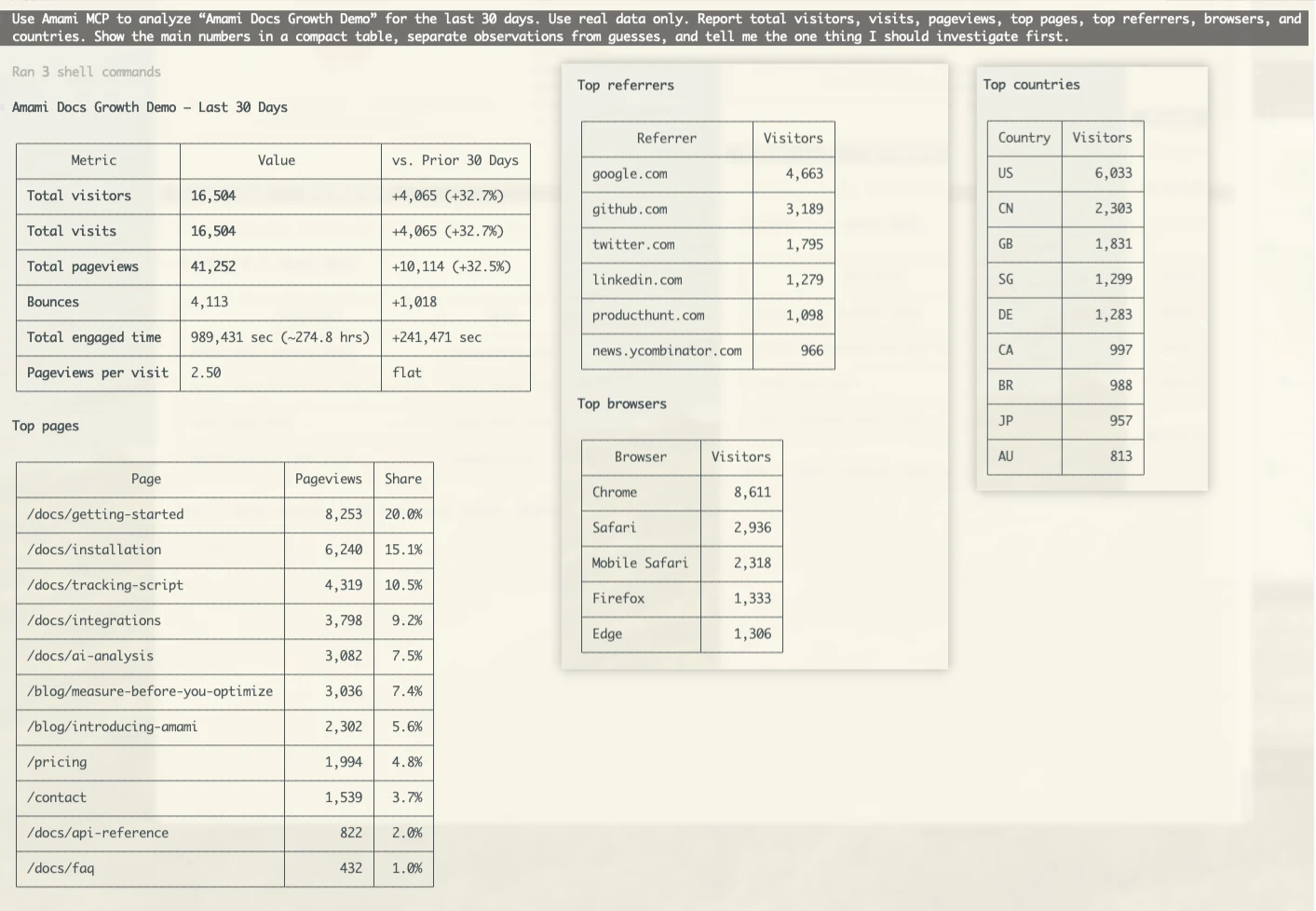
A real MCP report
Ask a question, then inspect the evidence.
Amami returns the selected time range, metrics, and observations to the AI client so the next action can be reviewed against the underlying data.
💬
What you can ask your AI assistant
"How did the landing page perform this week?" — Get traffic summary with trend analysis and source breakdown.
"Which source converts best?" — Compare channels before deciding where to investigate or invest.
"What changed after the Product Hunt launch?" — See before/after comparison with specific impact metrics.
"Which event should I track next?" — Identify gaps in the funnel and the data needed to investigate them.
"What changed in traffic on Tuesday?" — Compare available traffic, referrer, and event data without assuming a cause.
🌐
Daily Growth Summaries
Start each day with a concise traffic report: yesterday's visits, top pages, conversion events, and changes worth reviewing.
🚀
Launch Monitoring
Review real-time traffic during product launches. Compare referral sources and inspect conversion changes as they arrive.
🔧
Funnel Diagnosis
Compare pageviews, CTA clicks, and signup completions to identify a funnel step that needs further investigation.
📈
Trend Analysis
Compare historical traffic patterns, growth trajectories, and recent changes using the data available to your authorized tools.
⚡
Start with one prompt
Start with this guided setup prompt, then review browser authorization and the resulting tool access:
Read and follow the canonical Amami MCP and Skills installation guide at https://analytics.amami.dev/install/mcp-install.md. Use this guide as the only setup source. Do not use web search or another installation guide.